STIG Hardening and a NIST SP 800-171 Baseline Scan
SimulationTwo complementary Windows 10 labs: a broad automated SCAP baseline scan, and a small set of DISA STIG controls implemented and validated by hand with exported evidence, both mapped to NIST SP 800-171.
Verified Both labs' repos confirmed 2026-10-21. They are two separate labs, with no ID crosswalk between them.
At a glance
- Problem
- Windows hardening guidance usually ends up as either a document nobody follows, or a one-time scan nobody acts on. Neither one produces evidence that a control actually works.
- What I built
- Two labs that cover both halves of that gap. A SCAP benchmark scan establishes a baseline across 225 Windows 10 STIG rules. Separately, 4 of those controls are implemented by hand, validated, and backed with exported evidence rather than just a checklist.
- Evidence
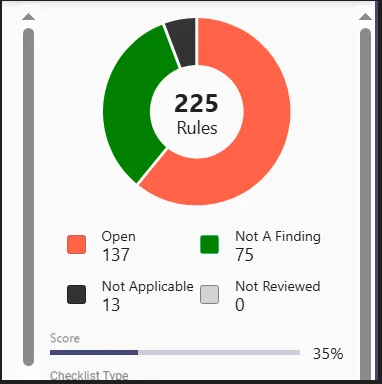
- 225 rules scanned (137 open findings, 75 not-a-finding, 13 N/A, ~35% baseline compliance); 4 controls implemented with PowerShell enforcement, validation, and evidence-export scripts for each.
- Status
- Simulation/lab work on a standalone VM, not a production system.
Verified Both labs' repos confirmed present and matching their documented figures as of 2026-10-21. The hardening lab's 4 controls and the baseline scan's findings were checked against each other directly -- they use different DISA STIG ID schemes with no crosswalk available, so they're presented here as two separate, complementary labs, not one scan-then-fix project. See 'What went wrong' below.
The problem
A STIG scan tells you where a system stands against a benchmark, but a list of 137 open findings isn't itself a plan — someone still has to pick what to fix, implement it correctly, and prove it stuck. I built two small labs to practice both ends of that: scanning broadly to see the real scale of a baseline system's gaps, and separately taking a handful of specific controls all the way through implementation, validation, and evidence export, the way an auditor would actually want to see it.
What I built
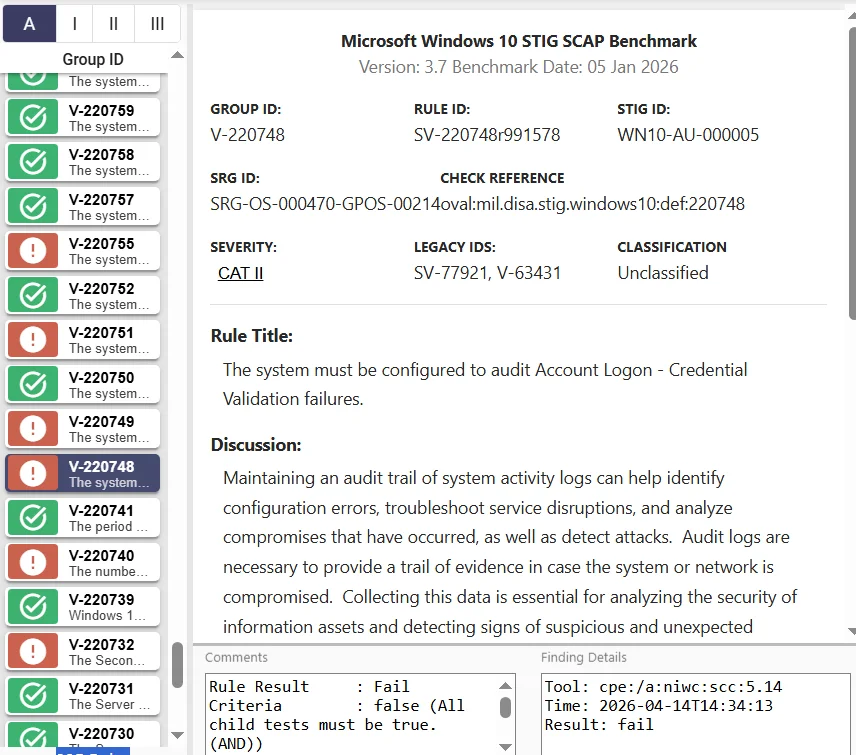
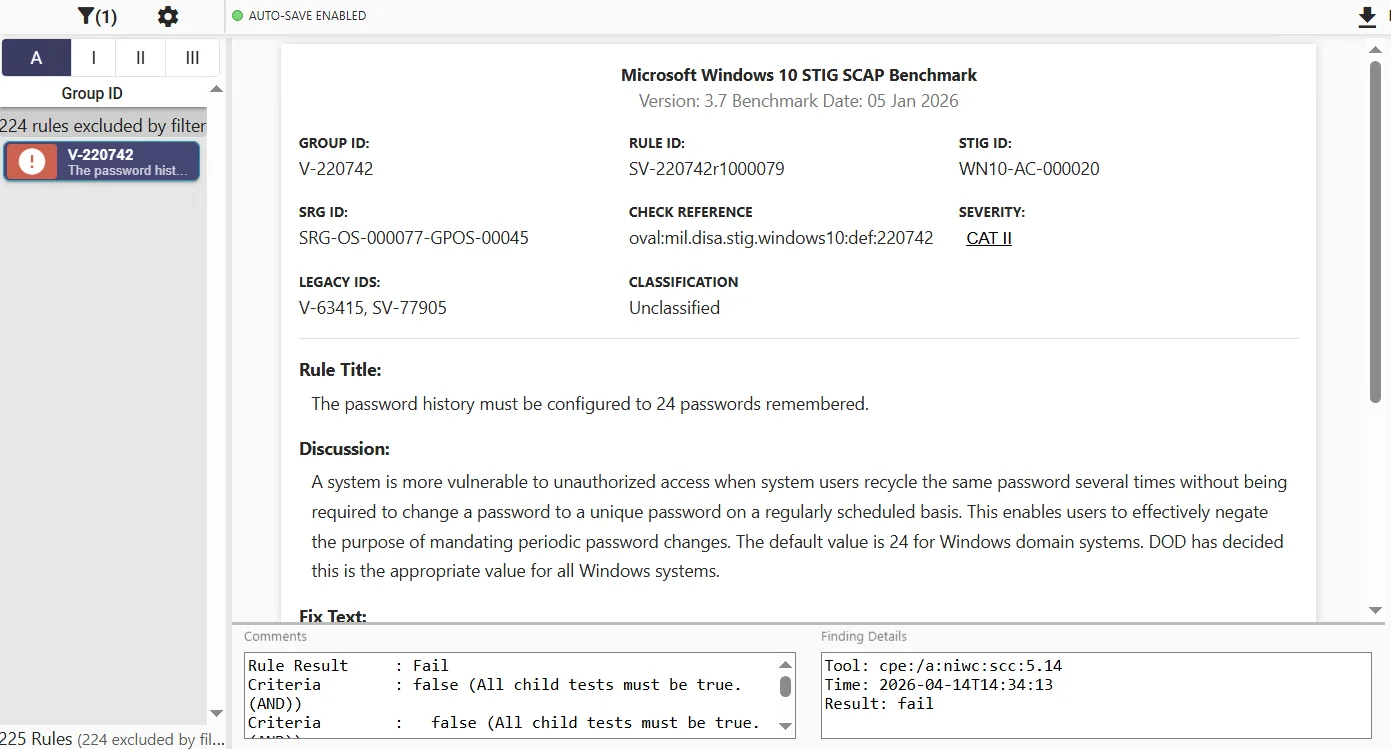
The baseline scan (windows10-stig-baseline-assessment): a SCAP Compliance Checker scan against a pre-hardening Windows 10 VM, using the DISA Windows 10 STIG Benchmark V3R7. Full results: 225 rules assessed, 137 open, 75 not-a-finding, 13 not applicable, about 35% compliance. Five of the highest-severity findings (password history, account lockout threshold, audit logon events, firewall, SMBv1) are documented in detail as a curated sample, not all 137 individually.
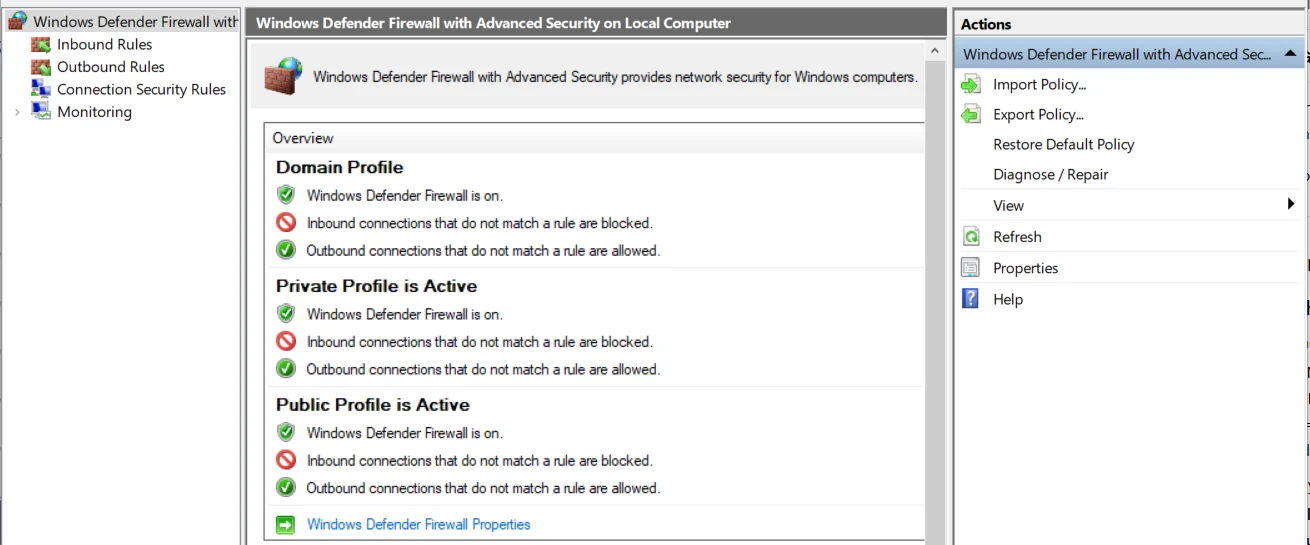
The hardening lab (stig-800-171-compliance-lab): 4 specific DISA STIG controls — firewall enabled, inbound traffic restricted, firewall logging enabled, and account lockout policy — each implemented via local policy/PowerShell, validated, and backed by exported evidence, mapped to NIST SP 800-171. Its own README is upfront that this is a narrow slice: "Additional control families planned."
Decisions and trade-offs
- Chose to scope the hardening lab to 4 controls instead of attempting broad coverage, because evidence-backed validation of a few controls beats an unverified checklist of many — the same principle the GRC Security Program case study makes about automating evidence checks.
- Chose an automated SCAP scan for the baseline rather than starting with hand validation, because that's how a real assessment actually starts: triage broadly first, then decide where hand-validation effort is worth spending.
- Chose not to present these as one continuous "scan, then fix" story, once I couldn't confirm the two labs' findings actually overlap — see below.
What went wrong, and what I changed
While fact-checking this case study (and a resume line that fed into it), I found I'd been describing these two labs as a single project: scan 225 rules, then fix 4 of the findings it turned up. That's not something I'd actually confirmed.
The hardening lab identifies its controls by DISA Vulnerability ID — V-241989, V-241990, V-241991, V-220739/V-220740/V-220741. The baseline scan's documented findings use a different identifier format — Rule IDs like WN10-FW-000030 and WN10-AC-000005. Real DISA STIGs do carry both an ID scheme for the same underlying checklist item, so these could plausibly be the same controls — but I don't have a crosswalk to confirm it, and the baseline scan repo only documents 5 of its 137 findings in enough detail to check against. Two of those five are in the same problem areas as the hardening lab's controls (firewall, account lockout), but "same problem area" isn't "same verified finding."
The honest version: two labs, built independently, that happen to cover some of the same ground. I corrected the framing here and in my resume rather than publish the tidier, unconfirmed story.
What's verified, and what isn't
- Verified (confirmed 2026-10-21): the hardening lab's 4 controls and their specific DISA Vulnerability IDs; PowerShell enforcement, validation, and evidence-export scripts exist for each; the baseline scan's rule counts (225/137/75/13) and ~35% compliance score.
- Not verified: whether the hardening lab's 4 controls are actually among the baseline scan's 137 open findings — no ID crosswalk available, and the scan doesn't itemize all 137 rules in the repo.
- Not yet done: running the baseline scan's SCAP benchmark against the hardening lab's VM, before and after its 4 controls are applied, so a before/after compliance delta is actually measured on one system instead of implied across two.
What I'd do next
- Run the SCAP benchmark against the hardening lab's own VM, before and after its 4 controls, to get a real measured delta instead of two separate numbers.
- Expand the hardening lab's control count — 4 of 225 is intentionally narrow for now.
- Build an actual Vuln-ID-to-Rule-ID crosswalk if I want to keep describing this as connected work rather than two parallel labs.
Links
- Repo: github.com/MgnCoding2020/stig-800-171-compliance-lab
- Related baseline scan: github.com/MgnCoding2020/windows10-stig-baseline-assessment