Cyber Home Lab: Identity Controls in a Live Tenant, Audited Against Themselves
In progressEntra ID and SharePoint governance built in a real Microsoft 365 tenant — then reviewed against itself, which is how I found that the audit log had never been turned on.
Verified Confirmed against the repo 2026-10-25. Two of its labs are still in progress, and Conditional Access is report-only, not enforcing.
At a glance
- Problem
- Every other GRC project I've built is a simulation for a company that doesn't exist. Paper controls can be written to pass their own review. A real tenant pushes back.
- What I built
- Identity and information-governance controls in a live Microsoft 365 tenant — privileged access moved from standing to just-in-time, an access review run to completion, SharePoint permissions broken out of inheritance, external sharing tightened per-site, and unified audit logging enabled and proven.
- Evidence
- 45 screenshots, PowerShell scripts with their session transcripts, exported Conditional Access policy JSON, a sign-in log export, and a POA&M — all committed to the repo.
- Status
- In progress, and genuinely so.
Verified Confirmed against the repo on 2026-10-25. Lab 02 (cloud identity) is marked Complete; Lab 06 (SharePoint) is In progress with Days 1-4 done and Days 5-6 outstanding; Lab 04 (Active Directory) is In progress; Lab 05 (STIG) is empty scaffolding and nothing here claims it. The audit-log timeline quoted below is the real transcript output committed at 05-sharepoint-admin/transcripts/02-search-unified-audit-log.txt. Conditional Access policies are configured in report-only and are not enforcing; Security Defaults is what enforces MFA in this tenant today.
The problem
My GRC Security Program case study builds a complete program for a fictional coffee shop. It's honest about being a simulation, but a simulation has a structural weakness: I wrote the controls and the evidence and the review. Nothing in it could tell me I was wrong.
So I wanted the opposite — a real tenant with real licensing limits and real consequences for misconfiguration — and then to review my own work in it the way an auditor would. The interesting result wasn't the controls I configured. It was what the review found about them.
What I built
Two halves, in one tenant.
Identity (Entra ID). Users, a security group, and a scoped role assignment — alice.admin as Security Reader, deliberately not Global Administrator. Conditional Access policies for MFA and sign-in risk, plus one requiring phishing-resistant authentication strength rather than the generic "require MFA" grant, which any registered method satisfies including SMS.
The piece worth dwelling on is privileged access. Alice's Security Reader role started as a standing Active assignment with no expiration — access she holds whether or not she's using it. Using PIM, that became an eligible assignment she has to activate, the standing one was removed, and role settings now require approver sign-off rather than self-service justification.
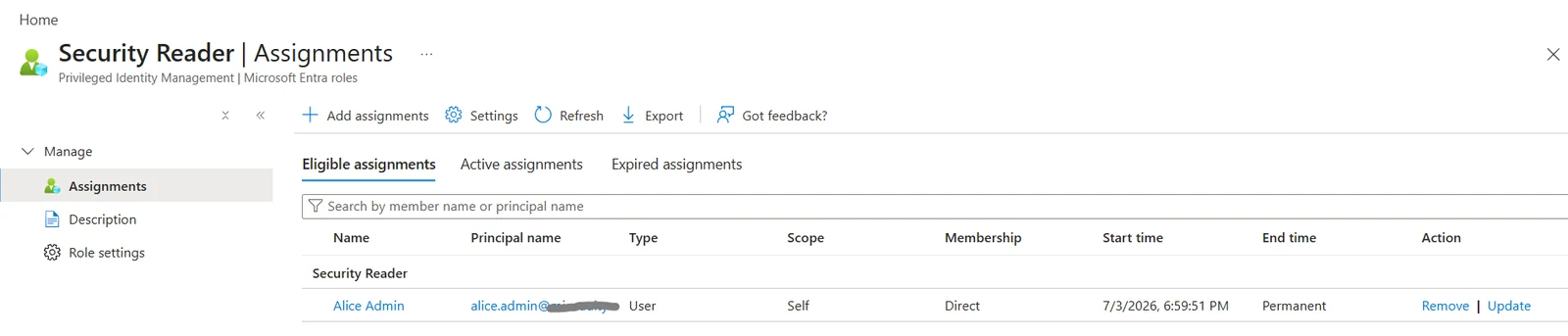
That assignment was then recertified through a one-time access review, with "require reason on approval" turned on so the decision carries a recorded justification.

Information governance (SharePoint Online). A document library broken out of permission inheritance, an eDiscovery case with legal hold and content search, and one decision worth spelling out: the tenant-wide external sharing default was "Anyone", the most permissive tier. Rather than tighten the whole tenant, I overrode sharing at site level for the site holding restricted evidence and left the looser default alone.
Decisions and trade-offs
- Chose a personal tenant over a university-managed one, because managed educational tenants lock down exactly the things this lab is about — Conditional Access, role assignment, licensing. Global Administrator rights were the requirement, and a pay-as-you-go subscription was the price of admission.
- Chose a scoped SharePoint Administrator role over Global Admin for day-to-day site work, because least privilege is cheap to apply at setup and awkward to retrofit.
- Chose a site-level sharing override instead of a tenant-wide change, because the risk lived in one site. Tightening everything would have been easier to configure and harder to justify.
- Chose report-only mode for Conditional Access, which is why none of those policies is enforcing today. That's a real trade-off, not a gap I'm dressing up: report-only is how you assess impact before enforcement, and it means the policies are validated but not yet load-bearing.
What went wrong, and what I changed
I went to pull an audit report on sharing activity and found that unified audit logging had never been turned on in this tenant at all. Not misconfigured — never enabled. Every action from the first day of the lab had happened without being recorded.
Enabling it is not retroactive. That history is simply gone and cannot be reconstructed.
Then the fix went wrong in a more interesting way. I'd concluded the blocker was that the tenant had never run Enable-OrganizationCustomization, a one-time Exchange Online bootstrap that tenant-wide admin cmdlets depend on. I wrote a remediation script to run both steps. Its own before-check reported IsDehydrated: False — the organization was already customized, probably triggered silently by an earlier admin-center action. My diagnosis was wrong. The actual fix was one line: Set-AdminAuditLogConfig -UnifiedAuditLogIngestionEnabled $true.
So I verified it end to end rather than trusting the toggle. I performed a deliberate test action — granting a user read access to the restricted library — and searched the log for it. Twenty-seven records came back, and the timeline matched what I'd actually done, including the part I'd done wrong:
5:52:50 PM   PermissionLevelAdded x6
5:54:19 PM   SharingInheritanceBroken, SharingSet
6:11:13 PM   SharingSet x4
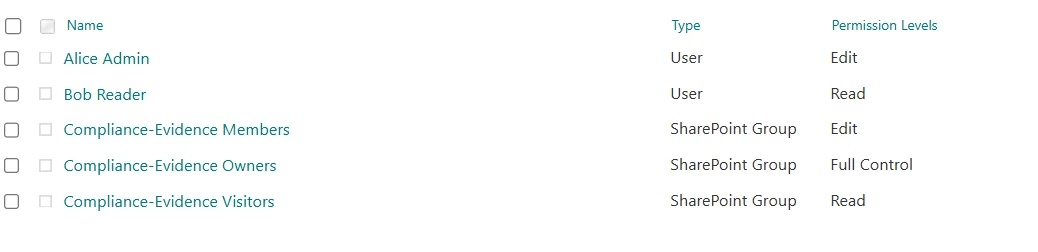
The 5:52 cluster is a mistake. I first granted access through the Teams Add members panel, which adds someone as an M365 Group Member — a group role, not a SharePoint permission level — handing them Edit through the group's existing entry on the library. Restricting the file itself to view-only then did nothing, because SharePoint permissions are additive, not overriding: a narrower item-level grant can't revoke access already held through a broader group one. The 5:54 pair is me undoing it; 6:11 is the correct approach, an explicit Read entry on the library's own unique permissions.
The audit log I'd just finished fixing captured my own error, with a timestamp and an actor. That is precisely what an audit log is for, and I'd rather demonstrate it that way than with a clean timeline that proves nothing.
What's verified, and what isn't
- Verified in the tenant, with committed evidence: the PIM conversion from standing to eligible access and the empty Active tab that proves it; the completed access review; the SharePoint permission model above; external sharing overridden at site scope; unified audit logging enabled and confirmed returning records; an eDiscovery case with hold and search.
- Configured but not enforcing: every Conditional Access policy is in report-only. Security Defaults is what actually enforces MFA in this tenant today — the CA policies are a more granular replacement still being validated, not the only thing standing between this tenant and unauthenticated access.
- Never exercised against its real targets:
alice.adminandbob.readerhave never signed in interactively. The only Conditional Access evaluation evidence is "Not applied" against the admin account, which both policies exclude by design — a break-glass exclusion that, in the case ofrequire-mfa-all-users, I hadn't documented until this review caught it. - Blocked, not skipped: a
Confidentialsensitivity label is built and published but stuck on a Microsoft-side policy sync error with no ETA, so it has never been applied to a document. - Not done: Lab 05 (Windows 10 STIG) is empty scaffolding. Lab 04 (Active Directory) has a domain controller, OU structure and GPOs, but the client domain-join and
gpresultverification are outstanding. Both are tracked in the repo's POA&M.
What I'd do next
- Sign in as
alice.adminandbob.readerso the Conditional Access policies produce real evaluation results against the users they actually target, then move the validated ones out of report-only. - Finish the Windows 10 STIG lab, which is the one section with scaffolding and no substance.
- Complete the Active Directory domain-join verification so the audit-policy GPO is proven applied, not just created.
Links
- Repo: github.com/MgnCoding2020/cyber-homelab
- The simulated counterpart: GRC Security Program — the same disciplines applied to a fictional company, where nothing can push back